In short
- A duplicate is two profiles with the same phone number: one from the app, the other from the bot.
- You can find them in "Members" → "Duplicates".
- The bot profile stays, and everything from the app profile moves into it.
- If both profiles have a balance, you choose: combine them or keep one.
- A merge cannot be undone.
Where do duplicates come from?
A buyer can join a shop in two ways: through the shop's bot or through the app. If someone did both, they have two profiles with the same phone number but different orders, history and balance.
This most often happens when a shop started out with a bot and later invited buyers to the app.
How do you find duplicates?
Open "Members" → "Duplicates". The app looks for pairs with the same phone number and shows them as cards: the app profile ("Web profile") on the left, the bot profile on the right. Each shows the name, sign-up date and number of orders.
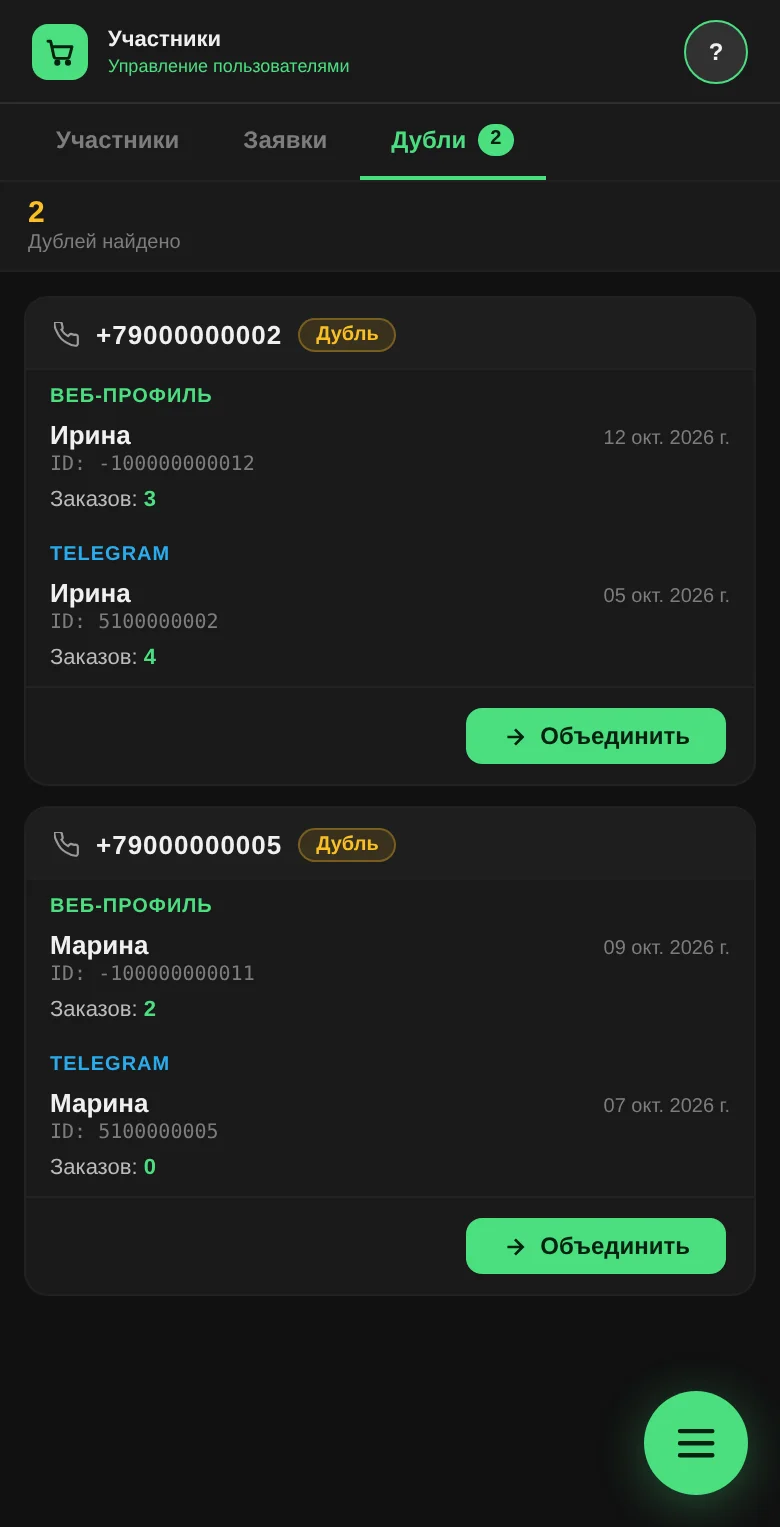
If there are no duplicates, you will see "No duplicates found. Every user has a unique phone number".
The number on the tab updates when you open it. Check "Duplicates" once a week, especially in the first month after moving to the app.
What gets moved over in a merge?
Press "Merge". The app shows which profile moves where and asks you to confirm.
The bot profile stays. Everything from the app profile moves into it:
- orders, cart and favorites;
- wallet transactions;
- deliveries, addresses and visits;
- notifications, news and push subscriptions;
- email sign-in and the PIN code.
The app profile is then deleted.
What do you do with two balances?
If only one profile has money on it, it simply moves over. If both have a balance, the app asks you to choose:
- "Combine": selected by default, with the total shown next to it;
- "Keep the bot balance";
- "Keep the web balance".
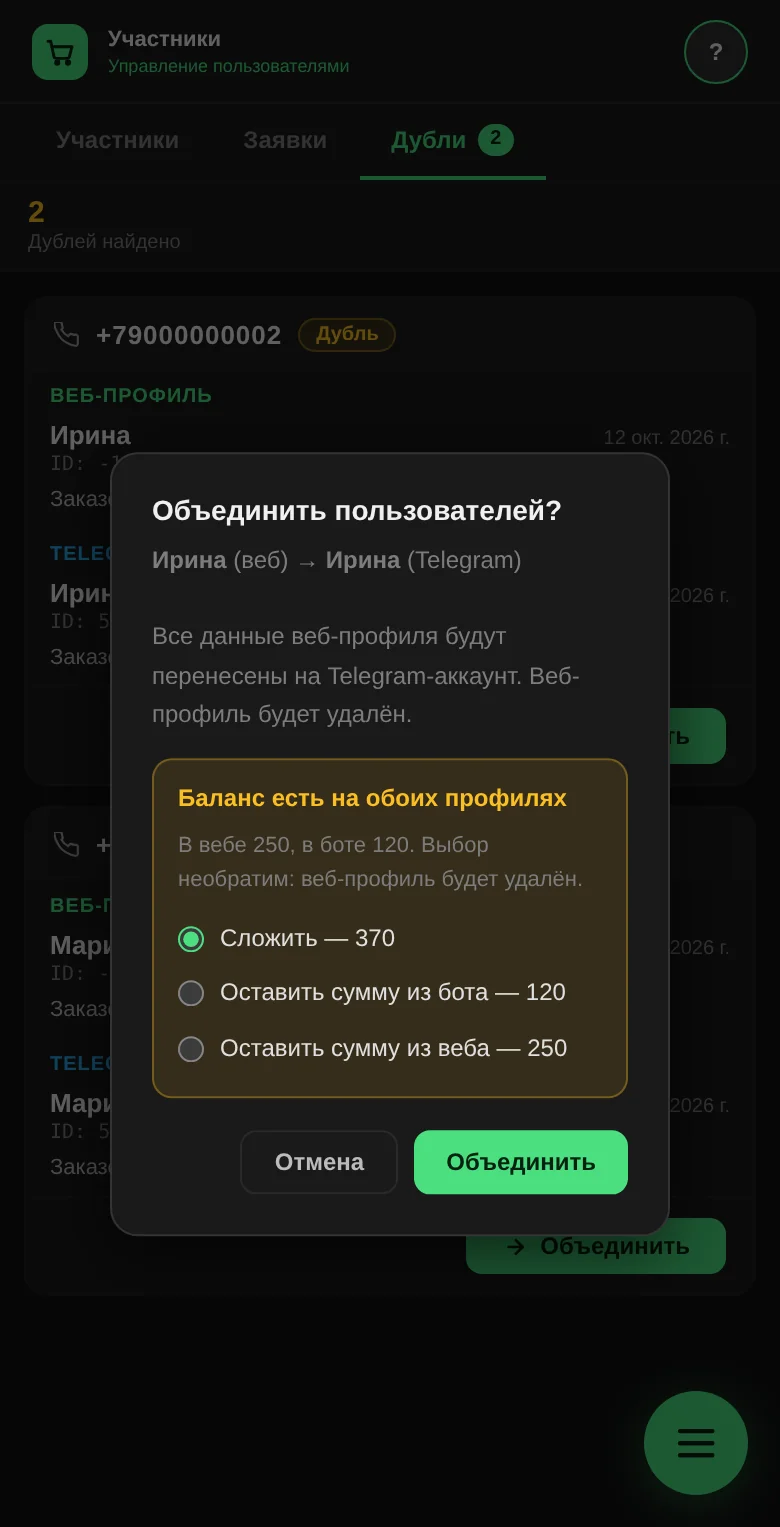
Combine them if you kept both balances accurately. Keep one if the other is out of date and you have already accounted for it in the first.
What happens to access and role?
Role. The higher of the two is kept. A staff member won't become a buyer because of a merge.
Access. If the bot profile isn't active (for example, it is blocked or waiting for approval), the app asks what to do: "Merge and grant access" or "Merge without granting access". The merge won't run until you choose.
Why does the buyer need to sign in again?
The app profile the buyer was signed in to has been deleted. On their next action, the app asks them to sign in. The buyer signs in with their phone number the usual way and lands in the merged profile, with all their orders and balance.
Warn the buyer in advance, ideally at pickup, so they don't panic that their orders are gone. If they can't sign in with a PIN, issue a new one in the member card.
What merging doesn't do
- It can't be undone. A deleted app profile can't be restored. Check the pair before you press the button.
- It doesn't find duplicates by name. Only by matching phone numbers. If a buyer signed up with a different number, the app won't see the pair.
- It doesn't merge two app profiles with each other. It only looks for "app + bot" pairs.
Questions and answers
How can you tell the merge worked?
The pair disappears from "Duplicates", and the remaining profile in "Members" has the orders of both.
Will orders from the two profiles get mixed up?
No. They simply end up in one profile, each with its own date and status.
Can you merge a blocked buyer?
Yes, and you decide whether to grant them access.