In short
- The cycle: catalog → collection → totals → purchase → receiving → pickup.
- A collection is a set of products with a shared order deadline.
- Suppliers sell by the box, so the purchase decision is made for each item.
- Whatever doesn't fill a box is cancelled or bought as surplus resale (pristroy).
- Payments and the supplier order stay with the organizer.
What is group buying, and who is a group buying organizer?
Group buying is when a group of buyers purchases goods from a supplier at the wholesale price. Each person takes as much as they need, and together they reach a wholesale volume.
The organizer is the person who runs the purchase: finds the supplier, collects orders, buys the goods and hands them out.
A collection is the period during which orders for products are accepted. A collection has an end date and time.
A box is the smallest pack the supplier sells. If a box holds 12 jars and 8 were ordered, the other four jars need to find a buyer.
Surplus is stock beyond the orders that the organizer bought to complete a box and offers for sale afterwards.
Step 1. How do you prepare the catalog?
The catalog is your products with their price, pack size and box size. The easiest way to set it up is from the supplier's Excel file, and then to maintain it in the matrix. Add photos: without one, a product won't appear on the public shop page.
Step 2. How do you invite buyers?
Set up your shop and invite buyers with ready-made materials for your group. To keep strangers out of your shop, turn on manual approval. If a buyer has signed up twice, the profiles can be merged into one.
Step 3. How do you open a collection and announce it?
Give the products a collection end date and time; that is your collection. Then publish the product list in your group: the software prepares it for you.
Step 4. How do you close a collection and add up the orders?
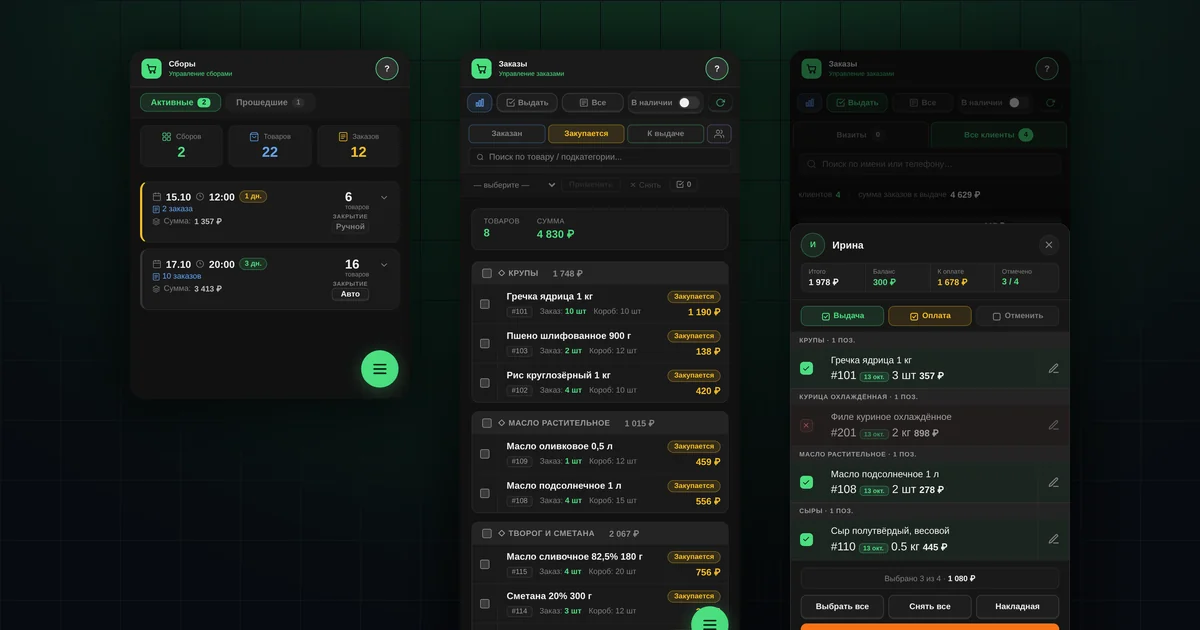
Close the collection manually or choose automatic closing. The software moves orders to "Purchasing", notifies buyers and shows totals for each item.
Does the collection go to the supplier automatically?
No. The software counts how much was ordered and what share of a box that is, but the organizer places the order with the supplier. It is a decision for each item:
- a full box — you order it;
- a little short — you take the box and offer the rest as surplus;
- too few orders — you cancel the item, and buyers get a notification.
For example, only 3 of a 15-unit box were ordered. Some organizers cancel such items; others buy the box and sell the surplus if the product sells well. You can cancel an item in "Orders".
Step 5. How do you receive the goods and tell buyers?
When the delivery arrives, check the quantity and weight. If less arrived or the weight differs, correct the orders. Then move the products to "Ready for pickup", and buyers get a notification.
Step 6. How do you hand out orders and record payment?
The buyer lets you know they are coming with the "Pick up order" button, you hand out the order in full or in part and deduct the payment from their balance. If you need delivery, see delivery management.
Send a pickup reminder to those who haven't collected their order.
What the software won't do for you
- It won't choose a supplier or negotiate terms.
- It won't take payments. You receive money the way you agreed with your buyers, and the software keeps the records.
- It won't order from the supplier. The decision on each item is yours.
Questions and answers
How is group buying different from an online shop?
Goods are ordered before they are bought, for a collection, not from a warehouse. But the software also lets you sell from stock.
Where do you start right now?
With the starter kit: preparing your shop, the first 7 days and materials for buyers.